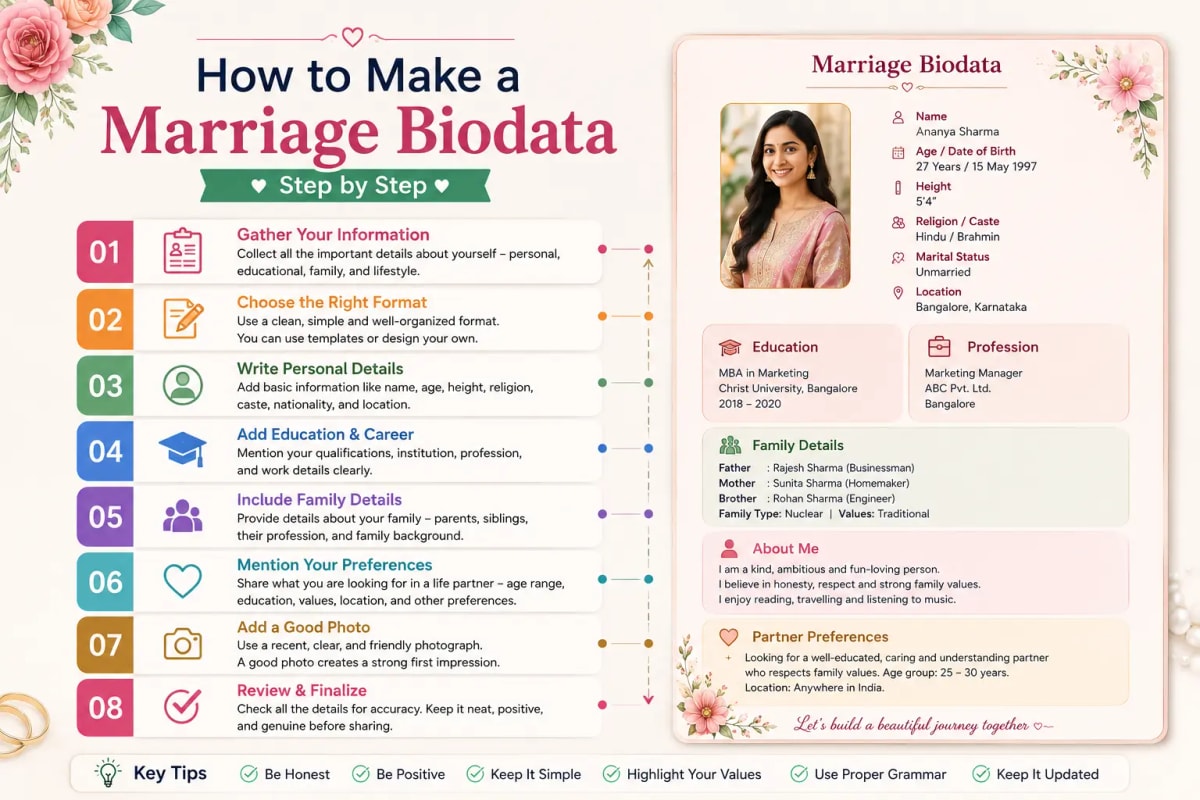
What do you need before you start?
Most people sit down to make a biodata and spend 20 minutes trying to remember their Gotra or looking for their parents' middle names. Gathering everything before you open the form saves that time.
Personal details you will need: full name as you want it to appear, date of birth (DD-MM-YYYY), exact time of birth — needed for horoscope calculation in Hindu families; morning, afternoon, or evening works if the exact time is not known — and place of birth (city and state, or district and state for small towns).
Horoscope details for Hindu families: Gotra (ask your father if you do not know it — it is always known in the family), Rashi (Vedic moon sign, different from Western astrology), Nakshatra (birth star), and Manglik status. If you do not know these, a free horoscope calculator on the site computes them from your date, time, and place of birth.
Family information: father's full name and occupation, mother's full name and occupation (Homemaker is a complete and respectful answer), number of brothers and sisters with their married or unmarried status, and family type — joint or nuclear.
Education and career: your highest qualification, institution name, current employer, designation, and city of work. Annual income is optional — include a range if your community expects it.
A recent photo: plain or light background, natural light, clear face, taken within the last 6 months, portrait orientation. The photo is the first element any family looks at.
Contact details: your parent's mobile number, not your own — this is the cultural convention in arranged marriage — and WhatsApp number if different.
How to make a marriage biodata — 6 steps
Step 1: Open the Marriage Biodata Hub tool. Go to marriagebiodatahub.com. The tool is on the homepage. No login, no signup, no email required. Your data is stored in your browser — it does not go to any server.
Step 2: Fill in Personal Details. The form opens with the Personal Details section. Enter name, date of birth, time of birth, and place of birth. For Hindu families, the Rashi, Nakshatra, Gotra, and Manglik fields are in this section. Fill them in if you know them. For Muslim families, the Sect and Biradari fields appear here instead of horoscope fields. What is Gotra? Your Gotra is your patrilineal clan lineage, traced back to a Vedic sage — it is passed through the father's line and usually known in the family.
Step 3: Fill in Family Details. Enter father's name and occupation, mother's name and occupation, number of brothers and sisters with married or unmarried status, and family type. Native village or ancestral town is useful here for families in Maharashtra, Rajasthan, UP, and Gujarat — it helps the other family understand your roots. What should I write for mother's occupation if she is a homemaker? Write 'Homemaker.' It is a complete and respectful answer — many educated families in India prefer this term.
Step 4: Fill in Education, Career, and About Me. Enter your highest qualification with institution name, current employer, designation, and work city. For the About Me section: write 3–4 specific sentences. Not 'I am a simple, family-oriented person' — write something real. 'I am a software engineer in Bengaluru who treks on weekends and calls home every Sunday evening' is more memorable than a paragraph of generic adjectives.
Step 5: Choose your template. After filling in your details, navigate to the template selection. Choose based on your community — Beautiful Traditional for Muslim families, Sober Blue Gold for traditional Hindu families, Modern or Neel for IT professionals — and based on how you will share it (high-contrast designs for WhatsApp, ornate designs for printing). Browse all templates at marriagebiodatahub.com/templates.
Step 6: Download as PDF and share. Click Download PDF. The PDF is generated in your browser — no upload to any server happens. The file downloads to your device immediately. To share on WhatsApp, tap the share button on the download screen. It opens WhatsApp with the PDF attached and a message ready to send. Edit the message to add the recipient's name before sending.
How long does it take to make a marriage biodata?
5–10 minutes if you have your information ready. 20–30 minutes if you need to look things up — Gotra, parents' full names, exact date of birth. The longest part for most people is the About Me section. Preparing a few sentences about yourself in advance cuts the total time to under 5 minutes.
How to make a marriage biodata on mobile?
The tool works on any phone browser — iPhone Safari, Android Chrome, or any mobile browser. Go to marriagebiodatahub.com on your phone. The form is mobile-optimised. Fill in your details, upload your photo directly from your phone's gallery, choose your template, and download. The PDF downloads to your phone and can be shared directly to WhatsApp from there. One tip for mobile users: type your About Me paragraph in your notes app first, then paste it into the form — mobile keyboards make longer paragraphs harder to type directly.
Common mistakes when making a marriage biodata
Leaving the Gotra field blank in a Hindu biodata. This signals to a traditional family that the biodata is incomplete. If you genuinely do not know your Gotra, write 'Gotra not known' — it is honest and accepted. Do not leave it blank.
Using a photo more than 6 months old. Families notice. If the photo was taken 2 years ago and you look different now, it creates an awkward moment at the first meeting. A recent photo in natural light, no filters, plain background — that is all that is needed.
Writing 'I am a simple, honest, and family-oriented person' in About Me. This is the most common phrase in Indian marriage biodatas — it appears in roughly half of all profiles. It tells the other family nothing distinguishing about you. Write one concrete thing instead.
Putting your own mobile number in Contact Details. The convention in Indian arranged marriage is to put your parent's contact number — usually your father's. It signals that your family is actively involved in the process, which other families find reassuring.
A two-page biodata. Families reviewing 20–30 profiles at a time do not read page 2. Everything must fit on one A4 page. Use the single-page preview to check before downloading.
How to make a marriage biodata for different communities
Hindu North Indian families (UP, Bihar, Delhi, Rajasthan): Gotra, Rashi, Nakshatra, and Manglik are essential. Use Sober Blue Gold or Crimson Swirl Contrast — both read as formal and family-appropriate in the North Indian arranged marriage context. Hindu South Indian families (Tamil Nadu, Kerala, Karnataka): Natchathiram, Rasi, Jathagam section, and Kula are expected. Use Modern or Green Border Art — both print cleanly for sharing through a pandit or marriage bureau. Muslim families: Sect and Biradari fields replace horoscope fields entirely. Use Beautiful Traditional — it opens with Bismillah calligraphy and includes Islamic geometric elements that feel made for the community. Marathi families: Kul, Kulswamini, and Mulchi Gavi are community-specific fields. Use Beautiful Golden Border or the Lagna Patrika template — both have the visual aesthetic Marathi families recognise as appropriate. Sikh families: Gurudwara and Amritdhari status are useful additions. Use Sober Blue Gold. Christian families: Denomination and Diocese instead of Gotra and Manglik. Use Modern or Leafs Effect.
Frequently asked questions
How do I make a marriage biodata for free? Go to marriagebiodatahub.com. The tool is entirely free — no login, no payment, no watermark on the downloaded PDF. Fill in your personal details, family background, education, and About Me section. Choose a template suited to your community. Download as PDF. Share on WhatsApp. The whole process takes 5–10 minutes.
What information is needed to make a marriage biodata? You need: personal details (name, date of birth, time of birth, place of birth), horoscope details for Hindu families (Gotra, Rashi, Nakshatra, Manglik status), family background (parents' names and occupations, siblings, family type), education and career details, a recent photo, and your parent's contact number. A short About Me paragraph of 3–5 sentences is optional but strongly recommended.
Can I edit my marriage biodata after downloading it? Yes. Return to marriagebiodatahub.com on the same device. Your details are saved in your browser's local storage and will be pre-filled in the form. Make any changes and download a new PDF. This works as long as you use the same browser on the same device.
Ready to create your own biodata? Start with our free builder or browse premium templates.