The test that matters more than how it looks in the editor
Most people choosing a biodata font make the decision looking at a full-size preview on a laptop or desktop screen, in good lighting, at full zoom. That is almost never how the biodata actually gets read.
The real-world path: someone creates the biodata, downloads it as a PDF, sends it on WhatsApp. It gets forwarded — often two or three times — through different family members' phones before it reaches someone who might actually consider it seriously. That final person opens it on their phone, often in WhatsApp's built-in PDF preview (which compresses image quality further), sometimes in low light, sometimes on a mid-range Android device with a smaller or lower-resolution screen than whatever was used to design it.
A font that looks beautiful at 100% zoom on a laptop can become genuinely difficult to read by the time it reaches that final phone screen. This is the test every biodata font choice should pass: legibility at WhatsApp-forwarded, phone-screen, imperfect-lighting conditions — not legibility in the design tool.
Fonts that work well — by role
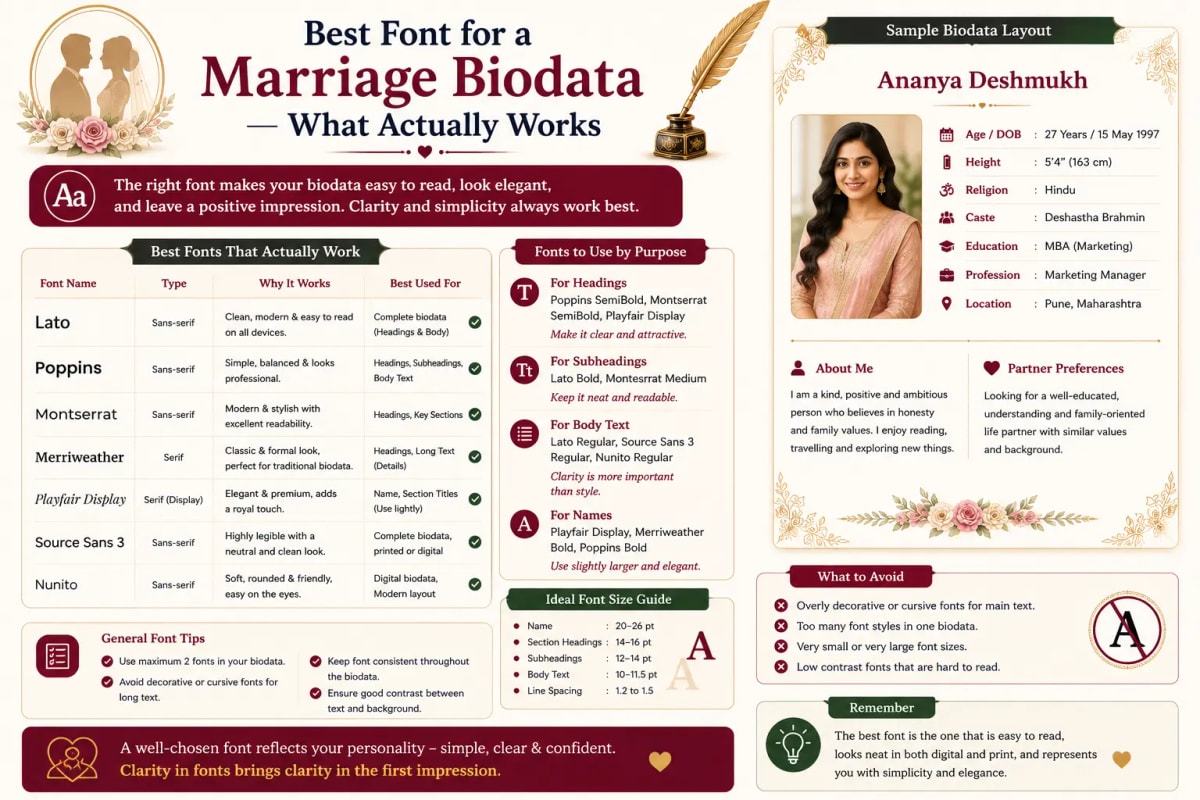
Heading fonts (for the name, "BIODATA" title, and section headers)
- Playfair Display — an elegant, high-contrast serif with distinctive character. Reads as formal and premium without feeling old-fashioned. Works well across Hindu, Muslim, Christian, and modern professional templates alike. Excellent choice for the candidate's name at the top of the biodata.
- Cormorant Garamond — a refined, classical serif with a slightly lighter weight than Playfair. Suits templates going for a more literary, understated elegance rather than bold formality. Works particularly well for Bengali and South Indian traditional-style biodatas.
- Cinzel — a classical, inscriptional serif with wide letter spacing, reading as ceremonial and dignified. Good for the main "BIODATA" title header or a family name banner, less suited for smaller headings due to its wide spacing taking up more horizontal space.
- Tiro Devanagari Sanskrit — for biodatas including a Sanskrit or Hindi invocation line ("Shree Ganeshaya Namah"), this font renders Devanagari script with an appropriately traditional, print-like character.
Body text fonts (for all the actual field information)
- Lora — a warm, highly readable serif designed specifically for on-screen reading. One of the safest choices for biodata body text — it stays clear at small sizes and across different screen qualities.
- Poppins — a clean, geometric sans-serif. Excellent for modern, minimal biodata designs, particularly for younger professional candidates or NRI-targeted biodatas where a contemporary, international look is preferred over ornate traditional styling.
- Noto Serif — designed by Google specifically for broad script support and screen legibility. A dependable, slightly understated choice that reads well universally — a safe default if you're unsure.
- Source Sans Pro / Inter — clean, highly functional sans-serifs, best suited for biodatas emphasising qualifications and career details prominently, appropriate for a doctor, engineer, or civil servant's biodata where the credential presentation matters.
Font pairing — heading + body combinations that work
Rather than choosing fonts in isolation, pair a heading font with a body font that complements it.
- Traditional Hindu biodata: Playfair Display (headings) + Noto Serif (body) — formal without being cold, works well with gold or maroon colour schemes.
- Muslim/Rishta biodata: Cormorant Garamond (headings) + Lora (body) — refined and warm, pairs well with teal or deep green colour schemes.
- Modern professional/NRI biodata: Poppins (headings) + Inter (body) — clean, international, works well for candidates leading with career credentials.
- South Indian traditional biodata: Cinzel or Playfair Display (headings) + Noto Serif (body) — dignified, pairs well with gold accents and traditional motifs.
- Marathi/regional biodata with Devanagari elements: Tiro Devanagari Sanskrit (for Sanskrit/Marathi text) + Lora (for English body text) — ensures both scripts render cleanly.
Fonts to avoid
- Comic Sans — a marriage biodata is a formal introduction document, and Comic Sans reads as unserious regardless of context.
- Times New Roman as the only font — not because it's a bad font, but because it's the default font in Microsoft Word, and using it without any intentional design choice signals no design thought went into the document at all.
- Heavy script/calligraphy fonts for body text — fonts like Great Vibes or Alex Brush look beautiful for a wedding invitation but become genuinely difficult to read when used for dense biodata field information.
- Condensed or narrow fonts for numbers — any font where numerals are tightly spaced or easily confused (1 and 7, 0 and 8) creates real risk for critical information like date of birth and contact number.
- Overly thin/light font weights for body text — a font at 200 or 300 weight can look elegant on a high-resolution laptop screen but disappears almost entirely when compressed through WhatsApp's PDF preview on a lower-quality phone screen. Stick to regular (400) or medium (500) weight for body text.
Font size — as important as font choice
Beyond which font, the size matters significantly for the WhatsApp-forwarded-phone-screen reality: candidate name / main heading at 24–30px in the source template (scales appropriately in the final PDF); section headings (Personal Details, Family Details, etc.) at 13–16px; body/field text at 11–13px minimum — below this, text becomes genuinely difficult to read once compressed through multiple WhatsApp forwards; and contact information should never be smaller than the general body text — if anything, slightly larger, since this is the information a family needs to act on quickly.
Ready to create your own biodata? Start with our free builder or browse premium templates.